If you're tax-resident in South Africa, SARS taxes your worldwide crypto disposals, including activity on offshore exchanges like Kraken. Where the exchange is based doesn't change your obligation to declare it. Kraken does not produce a SARS-specific tax report, so you need complete history exports (or an API sync) and a cost-basis engine that handles crypto-to-crypto swaps and multi-currency prices correctly.
Whether a Kraken gain counts as revenue or capital depends on your trading pattern, and the annual exclusion (R40,000 for the 2026 tax year, R50,000 from the 2027 year) applies across all your assets, not per exchange. That distinction, plus FIFO cost basis and record-keeping, is covered in full in How SARS taxes crypto in South Africa. What follows here is the Kraken-specific part: connecting the API, exporting Trades and Ledgers CSVs if you'd rather not, and what happens to the data once it's in.
Connect Kraken with a read-only API key
Coinfig supports Kraken API import, the fastest way to pull your history in without manual exports.
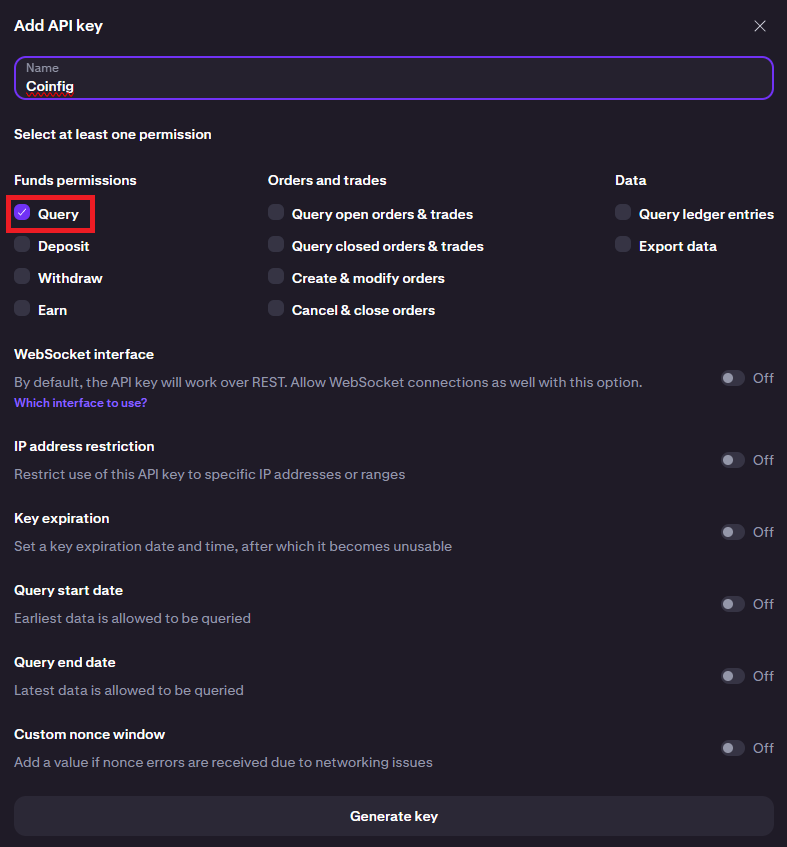
- In Kraken, create an API key with query permissions only, no trading or funding (how to create an API key).
- In Coinfig, add a new source and select Kraken. Enter the key and secret.
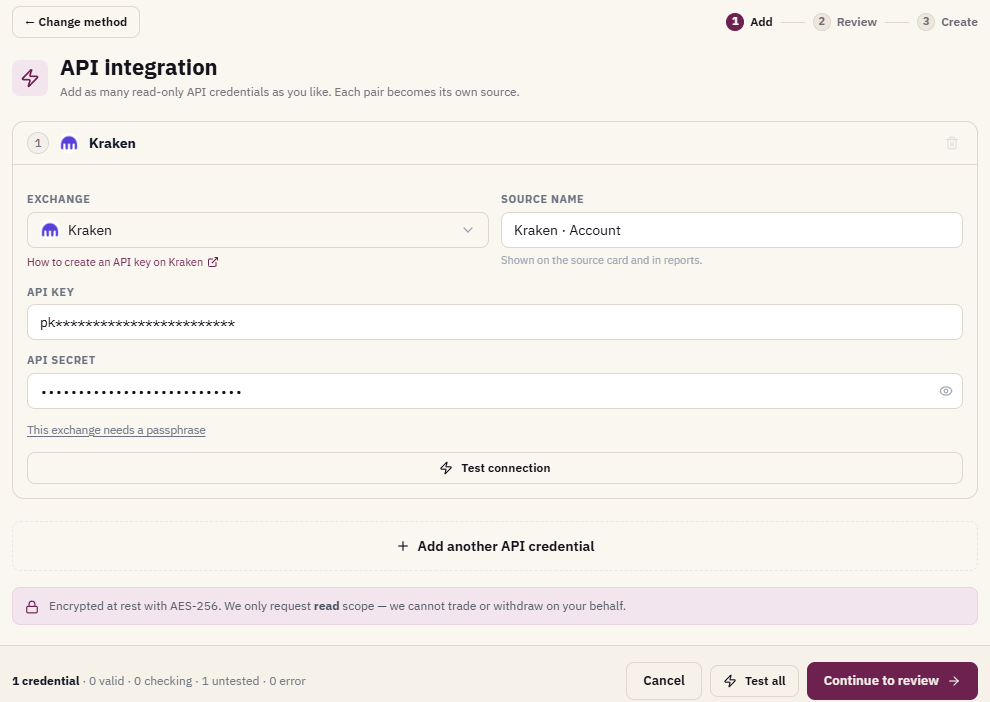
If your Kraken history predates what the API returns, supplement with CSV exports from the Documents Center (below). Coinfig's completeness check helps surface periods that may still be missing.
How to export Kraken history for taxes
If you'd rather not use the API, Kraken's Documents Center is the primary way to download CSV exports. For tax work you typically need both Trades and Ledgers exports. Trades show executions, while ledgers capture deposits, withdrawals, fees, staking, and other balance movements.
- Sign in at kraken.com.
- Click your profile icon → Documents.
- In Exports, click Create Export.
- Choose export type:
- Trades: buy/sell executions (set start and end dates, select CSV).
- Ledgers: deposits, withdrawals, fees, rewards (set start and end dates, select CSV).
- Click Generate. Processing can take from a few minutes up to a week for large histories.
- Return to Documents and download when the export shows ready.
Export the full period from your first Kraken transaction through to today. Kraken cannot export order history directly, so trade exports are the source for execution data.
Official guide: How to export your account history
Kraken CSV export tips for SARS reporting
- Run separate Trades and Ledgers exports if either file gets too large, covering the same date ranges.
- Include all assets and pairs you have traded. Filtering to one coin can hide acquisitions needed for base cost.
- Keep the raw CSV files. You may need to re-import if you add another exchange later.
What to declare to SARS from Kraken
On your South African return you need to translate Kraken activity into rand:
| Activity | Typical SARS treatment |
|---|---|
| Sell crypto for USD/EUR on Kraken | Disposal: gain or loss in ZAR at transaction time |
| Swap BTC for ETH | Disposal of BTC + acquisition of ETH |
| Deposit from a SA bank / Luno withdrawal | Transfer if between your own accounts (match in Coinfig) |
| Staking / earn rewards | Often ordinary income at receipt, with further gain/loss on later disposal |
| Trading fees | Generally affect proceeds or base cost |
You also need to consider activity on local exchanges (Luno, VALR) in the same calculation. Selling on Kraken does not exist in isolation if you bought the coins on Luno.
How Coinfig handles Kraken
Kraken is supported via read-only API sync and CSV import (not a SA-local integration like Luno or VALR, but a supported API exchange). Coinfig:
- Imports trades, ledger entries, and fees from Kraken API or CSV.
- Converts amounts to rand for SARS reporting using historical rates.
- Applies FIFO bundle cost basis for capital-account holdings.
- Matches Kraken withdrawals to deposits on Luno, VALR, or self-custody wallets where possible.
- Runs completeness checks before you export.
If you hold most assets on SA exchanges and only use Kraken occasionally, still add every source. Missing acquisitions on one platform breaks base cost on another. See the Luno tax report guide or VALR tax report guide if you also trade on those exchanges.
Frequently asked questions
Does Kraken provide a SARS tax report?
No. Kraken offers account history exports and (for some jurisdictions) local tax forms, but not a South African SARS filing document. South African residents calculate and declare gains themselves or through an accountant.
Do I need both Trades and Ledgers CSV exports?
Usually yes. Trades alone miss deposits, withdrawals, staking rewards, and some fees that appear in the ledger. For a complete picture, import both or use the API sync which pulls the underlying data.
How long do Kraken exports take?
Kraken states exports can take from a few minutes up to a week for large accounts. Plan ahead before the filing deadline. Do not wait until the last day.
Is Kraken taxed differently because it is offshore?
Tax residency determines your obligation, not where the exchange is based. South African tax residents generally declare worldwide crypto gains. The practical difference is currency conversion (USD/EUR → ZAR) and matching transfers to local exchanges.
Can I use Coinfig for Kraken only?
Yes, but if you have ever moved coins between Kraken and another wallet or exchange, add those sources too. Otherwise transfers may look like unexplained deposits or withdrawals, and base cost will be wrong.
Get started on Coinfig to connect Kraken via read-only API or upload your Trades and Ledgers CSVs, reconcile transfers, and export your report.
This article is general information, not tax advice. Crypto tax outcomes depend on your specific circumstances. For complex situations, consult a qualified tax practitioner.