If you sold, swapped, or spent crypto on VALR, SARS treats it as an asset disposal, not currency, and expects it on your return. VALR does not provide tax forms or SARS statements, so you need your complete transaction history and a consistent cost-basis calculation to work out what's owed. Coinfig can sync VALR via read-only API (fastest) or import a CSV export.
Whether a VALR gain counts as revenue (taxed at your marginal rate) or capital (eligible for the annual exclusion, R40,000 for the 2026 tax year and R50,000 from the 2027 year) depends on your trading pattern, not which exchange you used. That distinction, plus FIFO cost basis and record-keeping, is covered in full in How SARS taxes crypto in South Africa. What follows here is the VALR-specific part: connecting your account via API, exporting a CSV if you'd rather not, and what happens to the data once it's in Coinfig.
Connect VALR with a read-only API key (recommended)
Coinfig supports a direct VALR API integration, the fastest way to get your history in: no manual exports, and pre-filing refreshes are a click away.
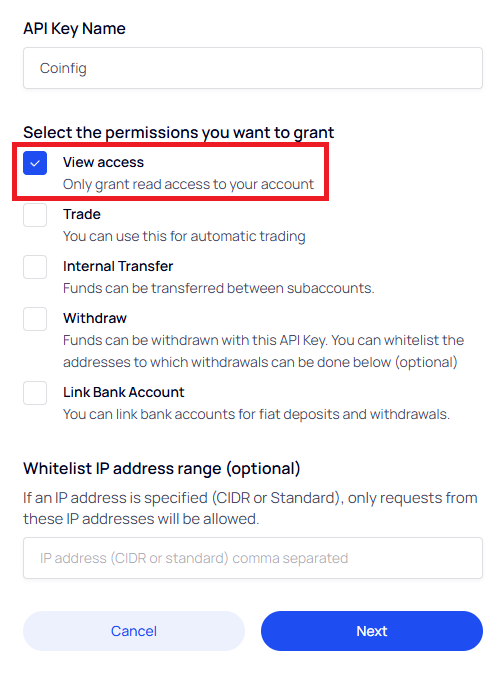
- In VALR, create an API key with View access only, leaving Trade, Withdraw, Internal Transfer, and Link Bank Account unchecked (how to set up your API keys).
- In Coinfig, add a new source and select VALR. Enter the key and secret.
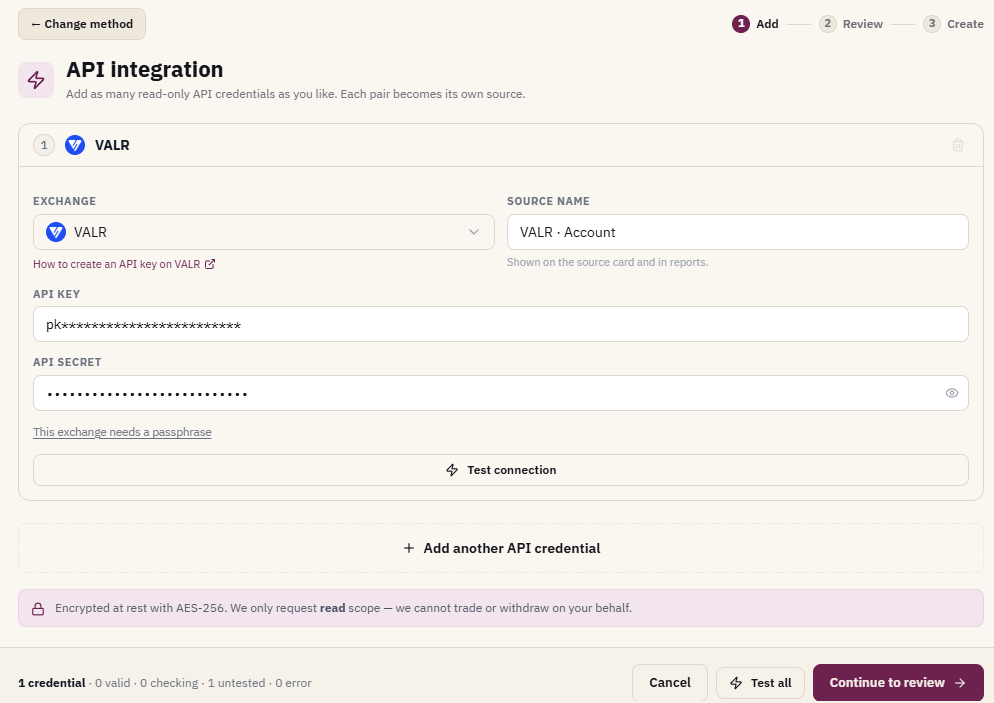
Coinfig imports history only. It cannot trade, withdraw, or move your assets.
How to export your VALR transaction history
If you'd rather not use the API, VALR also lets you export your history as a CSV. VALR provides transaction history exports in CSV format only, the format tax tools need. VALR's help centre confirms they do not issue tax forms or pre-built SARS statements. The export is your starting point.
- Sign in at valr.com.
- Open your transaction history from the account menu (web or app).
- Set the date range to cover your full VALR history, not just the current tax year.
- Download the CSV export and save it somewhere safe.
If you have used VALR for several years, export in chunks or use the widest date range available so no acquisitions are missing. Gaps in buy history usually inflate gains because base cost cannot be matched.
Helpful VALR articles:
What SARS expects on your return
For your tax year (1 March to end February), you should be able to show:
- Every disposal: proceeds and base cost in rand.
- Income items (staking, earn rewards, airdrops) at receipt value.
- Transfers between your own VALR wallets and external wallets, documented so they are not double-counted as disposals.
- A reasonable split between revenue and capital items where applicable.
From 1 March 2026, in-scope crypto platforms must report customer data to SARS under CARF, so SARS will receive third-party data about your VALR activity. Your declared figures should reconcile with what platforms report, another reason to work from complete history.
How Coinfig handles VALR
VALR is Coinfig's other native South African API integration (alongside Luno). Coinfig:
- Syncs VALR history via read-only API or CSV import.
- Calculates gains using the FIFO bundle method for crypto held on capital account.
- Matches withdrawals and deposits against transfers on other exchanges and wallets.
- Flags completeness issues before you rely on the final numbers.
If you also trade on Luno, add both sources. See the Luno tax report guide for that export path.
Coinfig provides calculations and reports, not personalised tax advice.
Frequently asked questions
Does VALR send a tax report to SARS?
No. VALR states explicitly that it does not provide tax forms or statements. You are responsible for declaring gains and losses on your return. Under CARF, VALR must report certain account data to SARS as an in-scope crypto service provider, but that is not a substitute for your own calculation.
Is the VALR API connection read-only?
Yes. Create a read-only API key in VALR. Coinfig uses it solely to import transaction data.
Do I need a separate export for each VALR product?
Export or sync all activity types you have used: spot trades, conversions, deposits, withdrawals, and any earn/staking rewards. A tax report is only as good as the underlying history.
What about VALR arbitrage or high-frequency trading?
Higher trading frequency can push more of your gains toward revenue treatment rather than capital. Coinfig calculates the numbers from your data. How items are classified on your return is a facts-and-circumstances question, so discuss with your accountant if you trade actively.
Can I import VALR CSV without using the API?
Yes. Upload your VALR CSV export in Coinfig. Ensure the date range is complete and run the completeness check before exporting your report.
Get started on Coinfig to connect VALR via read-only API or upload your CSV, check for gaps, and generate the figures for your return.
This article is general information, not tax advice. Crypto tax outcomes depend on your specific circumstances. For complex situations, consult a qualified tax practitioner.