If you sold, swapped, or spent crypto on Luno, SARS treats it as an asset disposal, not currency, and expects it on your return. Luno does not issue a complete tax statement for SARS, so you need your full transaction history and a calculation that applies the right cost-basis method. The fastest path is a read-only API connection to Coinfig, or a CSV export if you prefer files.
Whether a Luno gain is taxed as revenue (ordinary income at your marginal rate) or capital (CGT with the annual exclusion, R40,000 for the 2026 tax year and R50,000 from the 2027 year) depends on your trading pattern, not which exchange you used. That distinction, plus FIFO cost basis and record-keeping, is covered in full in How SARS taxes crypto in South Africa. What follows here is the Luno-specific part: connecting your account via API, exporting a CSV if you'd rather not, and what happens to the data once it's in Coinfig.
Connect Luno with a read-only API key (recommended)
Coinfig can sync your Luno history automatically via a read-only API key, the fastest way to get your history in and keep it fresh before you file.
- In Luno, go to Wallet → Security → API keys (direct link).
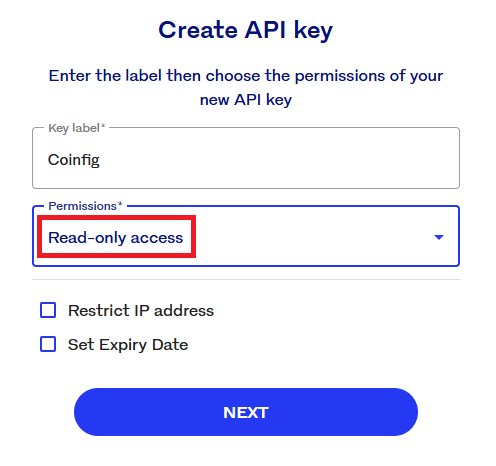
- Create a new key with read-only permissions only (no trading, no withdrawals).
- In Coinfig, add a new source and select Luno. Paste the API key and secret.
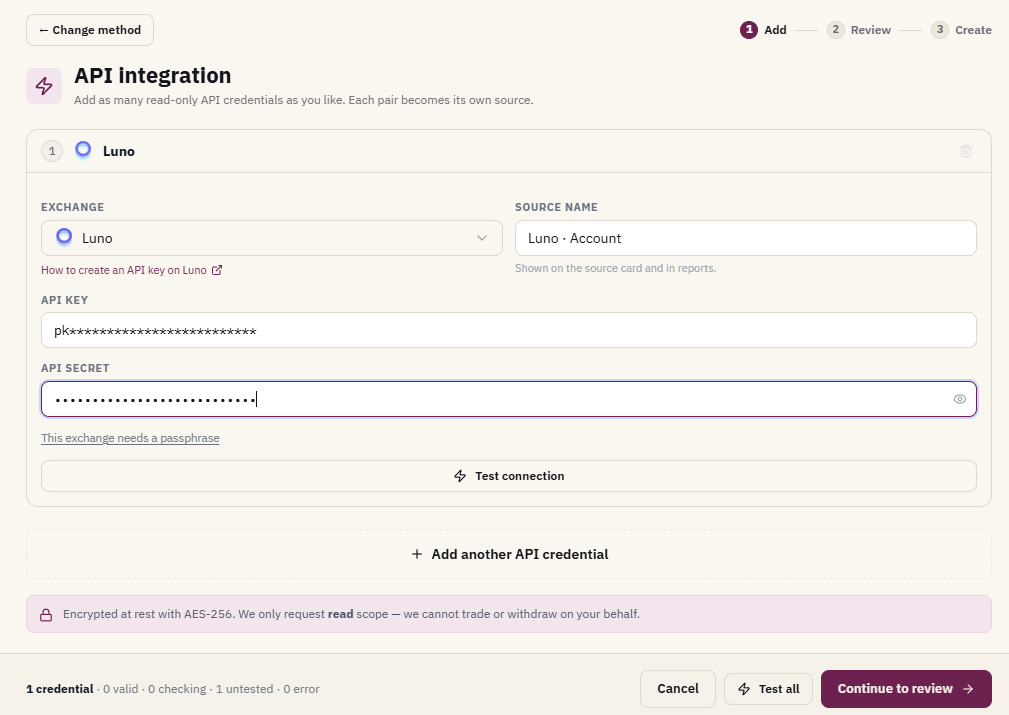
Coinfig uses the key only to import transaction history. It cannot place trades or move funds. The API path also makes it easier to refresh data before you file, without re-exporting CSVs.
How to download your Luno transaction history
If you'd rather not use the API, Luno also lets you download wallet statements from the web app. You will want CSV format for tax calculations (PDF is fine for your own records, but CSV is what import tools need).
- Sign in at luno.com.
- Open Portfolio and select the wallet you want a statement for.
- Scroll to the bottom and choose Download statement.
- Set a begin date and end date covering your full trading history, not just the current tax year. Missing earlier years means missing base cost.
- Select CSV as the format and create the statement.
- Download each statement from the Statements section.
Repeat for every wallet (BTC, ETH, XRP, and any others you have used). If you traded across multiple tax years, export year by year or in chunks that cover the full period from your first Luno transaction to today.
Official guide: How do I download my wallet statement?
What SARS expects on your return
You declare crypto-related gains or losses as part of your taxable income. In practice you need:
- A complete transaction schedule for the tax year (1 March to end February).
- Proceeds, base cost, and net gain or loss per disposal, in rand.
- A split between revenue and capital items where your activity warrants it.
- Records supporting transfers between your own wallets and exchanges.
From 1 March 2026, in-scope crypto platforms must report customer data to SARS under the Crypto-Asset Reporting Framework (CARF). That increases reconciliation pressure. It does not change how you calculate tax, and it does not remove your obligation to declare accurately.
How Coinfig handles Luno
Coinfig has a direct Luno integration, one of two native South African exchange API connections (alongside VALR). It:
- Syncs trades, fees, deposits, and withdrawals via read-only API, or accepts Luno CSV uploads.
- Applies the FIFO bundle method for cost basis (the approach most South African filers use for crypto held on capital account).
- Matches transfers between your Luno wallets and other sources so internal moves are not misread as taxable disposals.
- Runs a completeness check to flag gaps (missing deposits, unmatched withdrawals, or periods with no history) before you export.
Coinfig is a calculation and reporting tool, not a tax adviser. For complex treatment questions, have a qualified practitioner review the output.
Frequently asked questions
Does Luno report to SARS?
Luno does not file your tax return for you and does not issue a SARS tax certificate. Under CARF, in-scope crypto service providers must report certain customer data to SARS from the 2026 reporting period. You still need to declare your own gains and losses accurately on your return.
Is the Luno API connection read-only?
Yes. When you connect Luno in Coinfig, use an API key with read-only permissions. Coinfig imports history only. It cannot trade or withdraw on your behalf.
Do I need every year of Luno history?
Yes, if you are calculating gains on disposals this year. Your base cost for coins you sell now depends on what you paid when you bought them, possibly years ago. Export or sync the full history, not just the current tax year.
What if I also use VALR or an offshore exchange?
Add every exchange and wallet you have used. Gains on one platform depend on acquisitions that may have happened on another. Coinfig consolidates multiple sources. See the VALR tax report guide if you also trade on VALR.
Can I use Coinfig if I only have CSVs?
Yes. Upload your Luno CSV statements even if you do not want to use the API. Make sure you cover every wallet and the full date range.
Ready to turn your Luno history into numbers you can file with? Get started on Coinfig to connect Luno via read-only API or upload your CSVs, run the completeness check, and export your report.
This article is general information, not tax advice. Crypto tax outcomes depend on your specific circumstances. For complex situations, consult a qualified tax practitioner.